
Where Content Meets Container: Website Remediation for Digital Libraries and Journal Platforms
- 11 hours ago
- 4 min read

A procurement officer signing off on a library platform checks the VPAT. A faculty member uploading course materials thinks about the PDF. Neither is looking at the same thing, and neither view captures the full accessibility picture. The VPAT documents what the platform claims to support. The PDF carries what the content actually contains. The gap between them is where users with disabilities most frequently hit the wall.
S4Carlisle's work with healthcare education publishers and university clients makes this concrete. One engagement involved remediating 700-plus courses across multiple LMS environments, each platform carrying its own interface accessibility failures independently of whether the course content itself was conformant. Fixing the PDFs and EPUBs was necessary. It was not sufficient. The container had to be fixed too.
The VPAT Does Not Cover the Experience
A Voluntary Product Accessibility Template is a self-reported document. It tells a buyer which WCAG success criteria a platform supports and at what conformance level. What it does not capture is how that support holds up under real usage: whether a search filter that technically supports keyboard navigation actually announces its state correctly to a screen reader, or whether a dynamic results count updates in a way that assistive technology registers.
Platforms built on frameworks that claim ARIA support frequently implement that support inconsistently. A role attribute on a button is not the same as correct focus management when the button triggers a modal. An aria-label on a form field is not the same as a label that survives a JavaScript-driven page update. The VPAT may record full support against the relevant success criteria. The lived experience of a screen reader user navigating the interface can tell a different story entirely.
What Breaks at the Platform Layer
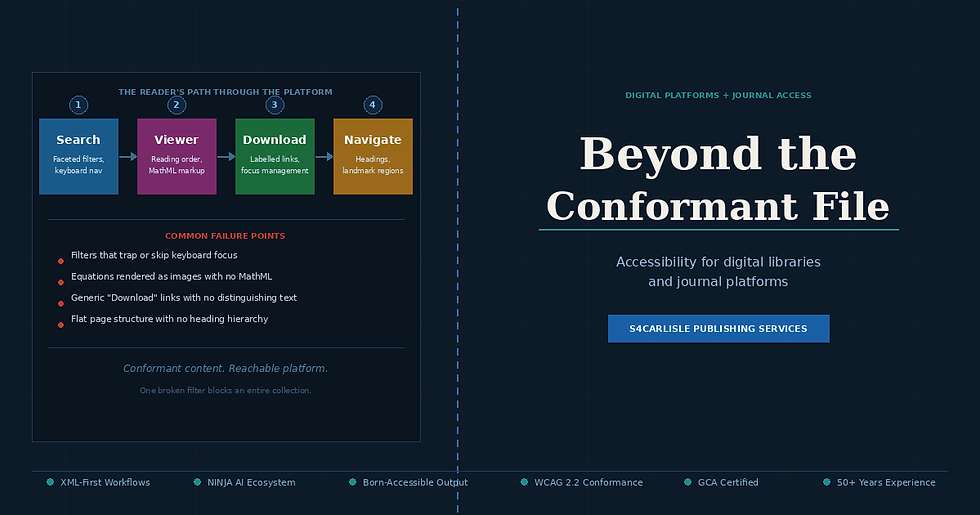
Academic and library portals share a set of structural features that create predictable accessibility failures. Search interfaces are the most common. Faceted filters built as dynamic JavaScript components frequently update the DOM without triggering ARIA live region announcements, which means a screen reader user activates a filter and receives no confirmation that the results have changed. They are left guessing whether the interface responded.
Dynamic content blocks on journal homepages and repository landing pages introduce a related problem. Carousels, tab panels, and expandable abstracts built without correct ARIA roles and keyboard interaction patterns force screen reader users into reading modes that the designer never intended. A tab panel that a sighted user clicks between with a mouse needs roving tabindex management and arrow-key navigation to work for keyboard users. Without it, the panel is functionally inaccessible regardless of how the content inside it is tagged.
Navigation structure deserves its own audit pass. Library portals often grow over years of incremental development, accumulating header navigation, sidebar menus, breadcrumb trails, and footer links that were never coordinated into a coherent landmark structure. A screen reader user navigating by landmarks hits a page with three separate nav elements, none of them labelled, and has no reliable way to distinguish the main site navigation from a journal-level contents panel from a search results filter bar.
Aligning ARIA Landmarks with Content Structures
Born-accessible content structures and platform-level ARIA landmarks need to be designed to work together, not independently. An EPUB 3.0 document with a correctly marked-up logical reading order carries that structure into an in-browser viewer. But if the viewer wraps that content in a div with no role attribute, inside a page that has no main landmark, the structural information in the EPUB is invisible to the platform's navigation layer. The content is accessible in isolation. The platform makes it unreachable.
The alignment requires decisions at the platform architecture level, not just at the content production level. Each major functional region of the interface needs a landmark: main for the primary reading or results area, navigation for each distinct navigational structure with a unique aria-label, search for the query interface, and complementary for supporting panels. These landmarks need to be consistent across page templates so a screen reader user who learns the structure on the homepage can apply that knowledge to a journal landing page and an article viewer without relearning the layout.
Search filters need ARIA grouping via fieldset and legend equivalents, or role="group" with aria-labelledby, so that individual filter checkboxes are understood in context rather than announced as isolated unlabelled controls. Result counts and active filter indicators need live regions with the appropriate politeness setting so updates are announced without interrupting the user's current reading position.
Two Layers, One Conformance Claim
The case for auditing content and platform together comes down to what a conformance claim actually covers. WCAG 2.2 applies to the full user experience of accessing digital content, not just to the files that contain it. A publisher whose PDFs pass PAC 2024 and whose EPUBs validate against EPUB Accessibility 1.1 has not established platform conformance. They have established document conformance. The two are related but distinct, and procurement mandates under ADA Title II and the European Accessibility Act are increasingly specific about which one they require.
S4Carlisle's accessibility programmes address both layers. The content remediation work, using XML-first production workflows and the NINJA AI Ecosystem for high volume processing, produces structurally sound documents. The platform audit work maps interface components against WCAG 2.2 success criteria, identifies failure points in search, navigation, and dynamic content, and produces remediation specifications that development teams can act on directly. One engagement, one conformance programme, no gap between what the document contains and what the platform delivers.
We audit and remediate content and platforms together, covering document structure, LMS environments, journal portals, and digital library interfaces end to end. Contact sales@s4carlisle.com to close the gap between your VPAT and your users' experience.


Comments